Toni Top: Design Options
Style
Construction
Sets the type of the top (t-shirt, raglan, sleeveless, etc.)
- Type: List
- Default: sleeveless
- options:
- set-in
- dolman
- raglan
- sleeveless
- racerback
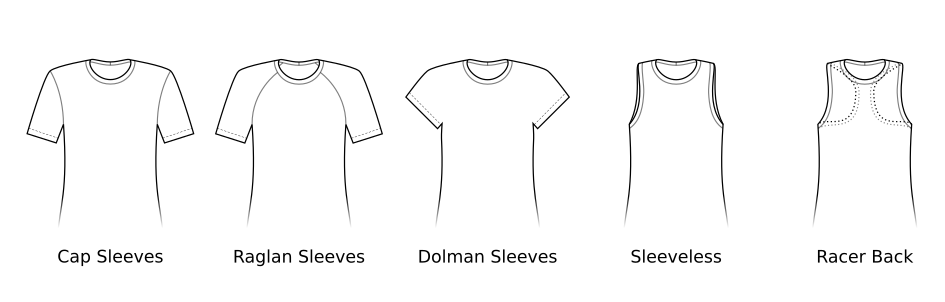
The construction option in the Toni pattern determines the sleeve and shoulder construction of the top.
This option controls how the sleeves attach to the body of the garment:
- Set-in: Traditional fitted sleeve construction with sleeve head inserted into armscye
- Raglan: Diagonal seam from neckline to armpit, creates a sporty look
- Dolman: Integrated sleeve and bodice with no sleeve seam, common for womenswear with shorter sleeves
- Sleeveless: No sleeves, finished armholes
- Racerback: Same as Sleeveless but with more exposed shoulder blades
Armhole depth
Controls the depth of the armhole. Higher values make a deeper armhole.
- Type: Percentage
- Default: 10%
- Minimum: 0%
- Maximum: 40%
This option controls the depth of the armhole and the vertical location of the armpit (for sleeveless tops).
Neck opening based on
Which measurement to use for the neck opening
- Type: List
- Default: waist
- options:
- neck
- head
- waist
- seat
This option controls which measurement to use for determining the default neck opening (without ease):
- Neck measurement will fit the neck opening to your neck measurement.
- Head measurement will fit the neck opening to your head measurement.
- Waist measurement will fit the neck opening to your waist measurement.
- Seat measurement will fit the neck opening to your seat measurement.
You have two choices to determine the minimum neck hole size.
If you primarily want to it be tight at the neck, select Neck measurement and select ease and the right fabric to make sure your head fits through.
Or select Head measurement and select a negative ease that’s not smaller than the stretch of your fabric would compensate for.
The bottom two values are more advanced and may result in excessively large neck opening sizes. Use with caution. We recommend using stretchy fabric and negative neck ease if necessary. You may also want to shift the neck opening more to your back using the back neckline depth option.
Neck opening size
Determines the circumference of the neck opening
- Type: Percentage
- Default: 100%
- Minimum: 65%
- Maximum: 150%
This option controls the neck ease.
The neck ease is a factor based on the selected measurement from the Neck opening based on option.
Changing the neck opening size will primarily change the depth at the front and back, however, it can also increase the width if necessary.
Neck width
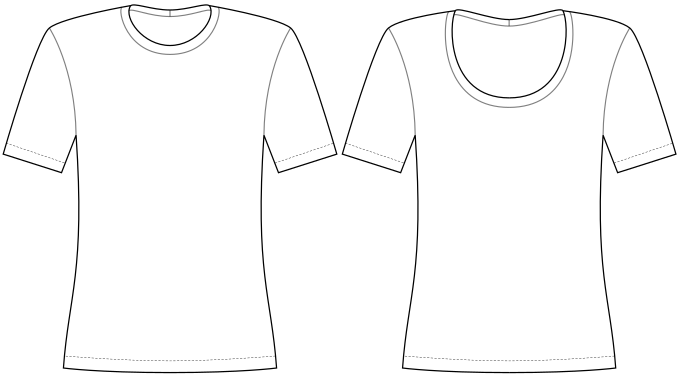
Make the neck opening deep and narrow, or wide and shallow.
- Type: Percentage
- Default: 60%
- Minimum: 0%
- Maximum: 130%
This option controls the width of the neck opening.
This option together with the used neck measurement and neck opening size option will determine the necessary depth of the neck, which will be automatically adjusted.
Back neck depth
The depth of the back neck relative to the front
- Type: Percentage
- Default: 30%
- Minimum: 5%
- Maximum: 200%

Controls how deep the neck opening is cut out in the back compared to the depth in the front.
For example a value of 50% makes the back neck opening half as deep as in the front. A value of 100% makes the back neck opening the same depth as in the front.
Neck opening shoulder angle
At which angle the neck opening goes over your shoulder
- Type: Degrees
- Default: 25°
- Minimum: 0°
- Maximum: 35°
The documentation for this option has not been created by the creator (yet). Such is preview…
Front neck opening shape
Change the shape of the front neck opening
- Type: Percentage
- Default: 100%
- Minimum: 0%
- Maximum: 200%
The documentation for this option has not been created by the creator (yet). Such is preview…
Length
The length of the top, measured from the waist down
- Type: Percentage
- Default: 55%
- Minimum: -15%
- Maximum: 100%
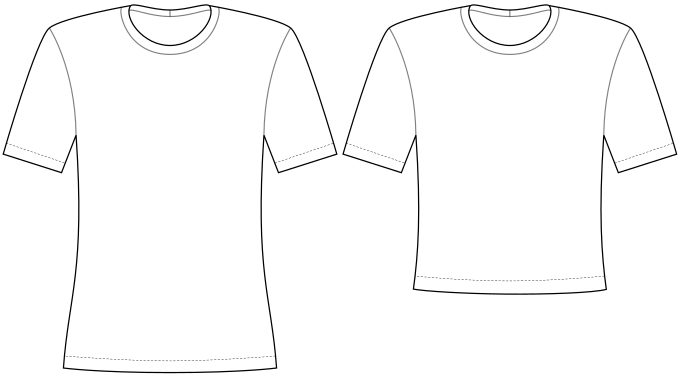
This option controls how far the shirt goes below the waist.
- At 0% the waistband will sit at the natural waist.
- At 100% the waistband will sit at the seat measurement.
- Values in-between will put the waistband between the waist and seat line.
- Values smaller than 0% will put the waistband above the waist (if you want to make a bustier or short crop top).
Back exposure
The side of the leg opening at the back
- Type: Percentage
- Default: -10%
- Minimum: -20%
- Maximum: 50%
This option controls how “cheeky” the back part is cut out. The higher this setting, the more area of your buttocks will be exposed.
Front exposure
The side of the leg opening at the front
- Type: Percentage
- Default: 10%
- Minimum: -10%
- Maximum: 50%
This option controls the coverage in the front. The higher this setting, the more open the legs will be cut out.
Back width
Controls the width of the garment around your bum
- Type: Percentage
- Default: 17.5%
- Minimum: 5%
- Maximum: 35%
This option controls the shape/width of the garment around your bum.
You can choose between more and less coverage.
Fit
Chest ease
The amount of ease at your upper body
- Type: Percentage
- Default: -10%
- Minimum: -10%
- Maximum: 25%
This option controls the ease at your chest.

The following table lists common values according to the fabric you’re using and the intended fit.
| Chest ease | Waist ease | Seat ease | Suggested fabric type | Description |
|---|---|---|---|---|
| > 20% | > 40% | > 25% | Heavy cotton jersey | Oversized, drapey and clearly away from the body. |
| 10% to 20% | 20% to 40% | 15% to 25% | Cotton jersey | Relaxed fit, hangs away from the body. Common in menswear t-shirts. |
| 5% to 10% | 10% to 20% | 10% to 15% | Light cotton jersey | Loosely fitted, follows the body outline without clinging. |
| 0% to 5% | 0% to 10% | 5% to 10% | Cotton jersey with spandex | Fitted, close to the body but not tight. |
| -10% to 0% | -10% to 0% | 0% to 5% | Cotton jersey with spandex, interlock | Very fitted, snug against the body. |
| -20% to -10% | -20% to -10% | -5% to 0% | Activewear knit, rib knit | Body-hugging with light compression. Common in ribbed tops and (compression) sportswear. |
You typically want to use a smaller range of ease for the chest ease, since that setting also affects the shape of the top near the shoulders and arms. Going too high will make the top oversized in a bad way, and going too low will make the fit too tight. Use about 15% for a relaxed look and about 5% for a fitted shirt.
You can use a larger range of ease values for the waist ease. Using around 30% will create a more drapey look that can, for example, hide a small belly. If you use values of 0% or lower, the fabric will be snug to your body, which can be useful for compression wear or to make an undershirt that doesn’t add bulk or wrinkles.
For the seat ease, choose something in the same general range of the waist ease. For large waist ease values, you can go a bit lower if you don’t want the hem to flare out. However, at the same time you don’t want it to be so tight that it rides up towards your waist.
Waist ease
The amount of ease at your waist
- Type: Percentage
- Default: -10%
- Minimum: -20%
- Maximum: 40%
If (and only if) you request to fit the waist, this option allows you to control the amount of ease at the waist.
If the waist is not fitted, this option is disabled.

The following table lists common values according to the fabric you’re using and the intended fit.
| Chest ease | Waist ease | Seat ease | Suggested fabric type | Description |
|---|---|---|---|---|
| > 20% | > 40% | > 25% | Heavy cotton jersey | Oversized, drapey and clearly away from the body. |
| 10% to 20% | 20% to 40% | 15% to 25% | Cotton jersey | Relaxed fit, hangs away from the body. Common in menswear t-shirts. |
| 5% to 10% | 10% to 20% | 10% to 15% | Light cotton jersey | Loosely fitted, follows the body outline without clinging. |
| 0% to 5% | 0% to 10% | 5% to 10% | Cotton jersey with spandex | Fitted, close to the body but not tight. |
| -10% to 0% | -10% to 0% | 0% to 5% | Cotton jersey with spandex, interlock | Very fitted, snug against the body. |
| -20% to -10% | -20% to -10% | -5% to 0% | Activewear knit, rib knit | Body-hugging with light compression. Common in ribbed tops and (compression) sportswear. |
You typically want to use a smaller range of ease for the chest ease, since that setting also affects the shape of the top near the shoulders and arms. Going too high will make the top oversized in a bad way, and going too low will make the fit too tight. Use about 15% for a relaxed look and about 5% for a fitted shirt.
You can use a larger range of ease values for the waist ease. Using around 30% will create a more drapey look that can, for example, hide a small belly. If you use values of 0% or lower, the fabric will be snug to your body, which can be useful for compression wear or to make an undershirt that doesn’t add bulk or wrinkles.
For the seat ease, choose something in the same general range of the waist ease. For large waist ease values, you can go a bit lower if you don’t want the hem to flare out. However, at the same time you don’t want it to be so tight that it rides up towards your waist.
Seat ease
The amount of ease at your seat
- Type: Percentage
- Default: -10%
- Minimum: -20%
- Maximum: 40%
Controls the amount of ease at your seat.
Note that the software will never make the seat smaller than the waist, so setting this to very low values might not have any effect.

The following table lists common values according to the fabric you’re using and the intended fit.
| Chest ease | Waist ease | Seat ease | Suggested fabric type | Description |
|---|---|---|---|---|
| > 20% | > 40% | > 25% | Heavy cotton jersey | Oversized, drapey and clearly away from the body. |
| 10% to 20% | 20% to 40% | 15% to 25% | Cotton jersey | Relaxed fit, hangs away from the body. Common in menswear t-shirts. |
| 5% to 10% | 10% to 20% | 10% to 15% | Light cotton jersey | Loosely fitted, follows the body outline without clinging. |
| 0% to 5% | 0% to 10% | 5% to 10% | Cotton jersey with spandex | Fitted, close to the body but not tight. |
| -10% to 0% | -10% to 0% | 0% to 5% | Cotton jersey with spandex, interlock | Very fitted, snug against the body. |
| -20% to -10% | -20% to -10% | -5% to 0% | Activewear knit, rib knit | Body-hugging with light compression. Common in ribbed tops and (compression) sportswear. |
You typically want to use a smaller range of ease for the chest ease, since that setting also affects the shape of the top near the shoulders and arms. Going too high will make the top oversized in a bad way, and going too low will make the fit too tight. Use about 15% for a relaxed look and about 5% for a fitted shirt.
You can use a larger range of ease values for the waist ease. Using around 30% will create a more drapey look that can, for example, hide a small belly. If you use values of 0% or lower, the fabric will be snug to your body, which can be useful for compression wear or to make an undershirt that doesn’t add bulk or wrinkles.
For the seat ease, choose something in the same general range of the waist ease. For large waist ease values, you can go a bit lower if you don’t want the hem to flare out. However, at the same time you don’t want it to be so tight that it rides up towards your waist.
Crotch width
The amount of fabric at the crotch
- Type: Percentage
- Default: 25%
- Minimum: 15%
- Maximum: 50%
This option controls the width of the crotch part.
We don’t have a measurement for this, so consider measuring a garment that fits you well.
The suggested range for adult women is between 7 and 9 Centimeters (or about 3 inches).
The suggested range for adult men is between 9 and 11 Centimeters (or about 4 inches).
Conditional Options
Sleeve length (Dolman)
The length of the sleeve as a percentage of the distance from the shoulder to the wrist
- Type: Percentage
- Default: 30%
- Minimum: 1%
- Maximum: 120%
Controls the length of the sleeves with dolman style selected.
Raglan angle (back)
The angle of the raglan back seam
- Type: Degrees
- Default: 15°
- Minimum: 0°
- Maximum: 25°
This advanced option is only enabled for raglan sleeves. It fine-tunes the raglan seam curve on the back to add more or less fabric to your back shoulders.
Raglan angle (front)
The angle of the raglan front seam
- Type: Degrees
- Default: 20°
- Minimum: 0°
- Maximum: 30°
This advanced option is only enabled for raglan sleeves. It fine-tunes the raglan seam curve on the front to add more or less fabric near your collarbones.
Raglan offset (back)
The offset of the raglan back seam
- Type: Percentage
- Default: 24%
- Minimum: 1%
- Maximum: 99%
This advanced option is only enabled for raglan sleeves. It controls the position of the raglan seam on the back, whose upper point can move in the area between the center back and the top of the shoulders.
Raglan offset (front)
The offset of the raglan front seam
- Type: Percentage
- Default: 33%
- Minimum: 1%
- Maximum: 99%
This advanced option is only enabled for raglan sleeves. It controls the position of the raglan seam on the front, whose upper point can move in the area between the center front and the top of the shoulders.
Arm opening pitch (back)
The curve on the back of the arm opening for sleeveless designs
- Type: Percentage
- Default: 80%
- Minimum: 60%
- Maximum: 90%
Controls how far the arm opening is cut out on the back.
Arm opening pitch (front)
The curve on the front of the arm opening for sleeveless designs
- Type: Percentage
- Default: 90%
- Minimum: 70%
- Maximum: 95%
Controls how far the arm opening is cut out on the front.
Cups
Enable generation of cups
- Type: Boolean
- Default: true
Whether to include cups in the design.
When enabled, the pattern will generate cups based on your bust measurements if necessary.
The pattern might skip creating cups if no shaping is necessary, even if the cups option is enabled.
Cups are only supported for sleeveless constructions.
Arm opening size
The size of the arm opening for sleeveless designs
- Type: Percentage
- Default: 60%
- Minimum: 20%
- Maximum: 80%
Controls the exposure of the arm openings on the shoulders. This option increases or reduces the shoulder strap width as needed.
Waist fitting dart percentage
How much of the waist should be fitted using the dart
- Type: Percentage
- Default: 50%
- Minimum: 0%
- Maximum: 100%
If waist fitting is set to use darts, this is the percentage of the excess waist width that will be fit using darts. The remaining percentage will be fit using the side seam.
Sleeve length
The length of the sleeve as a percentage of the distance from the shoulder to the wrist
- Type: Percentage
- Default: 30%
- Minimum: 10%
- Maximum: 120%
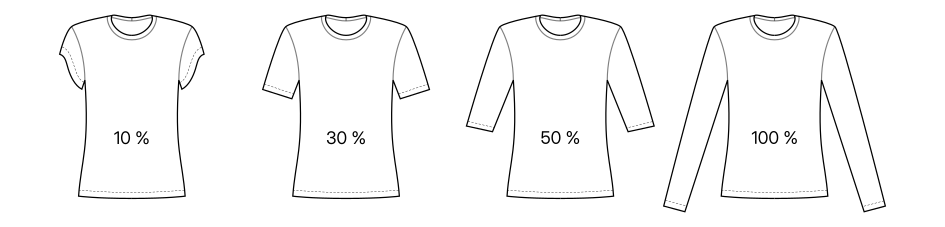
Controls the length of the sleeves, measured as a percentage from the distance of your shoulder point to the wrist.
The sleeve length can be set to a shorter length than the shoulder-to-biceps-circumference measurement. In that case, the hem of the sleeves will be curved to match the desired length on the top side while keeping enough fabric near the armpit.
The following values are typical values for the sleeve length setting, depending on the look you want to achieve:
| Sleeve type | Sleeve length | Notes |
|---|---|---|
| Cap | ≈10% | Consider using Dolman-style sleeves instead |
| Very Short | ≈20%–30% | Common for ready-to-wear women’s t-shirts |
| Short | ≈30%–40% | Common for ready-to-wear men’s t-shirts |
| Elbow Length | ≈50% | |
| Three quarters | ≈75% | |
| Long | ≈100% | Goes to your wrist |
Sleeve width
The width of the sleeve opening
- Type: Percentage
- Default: 30%
- Minimum: -10%
- Maximum: 200%
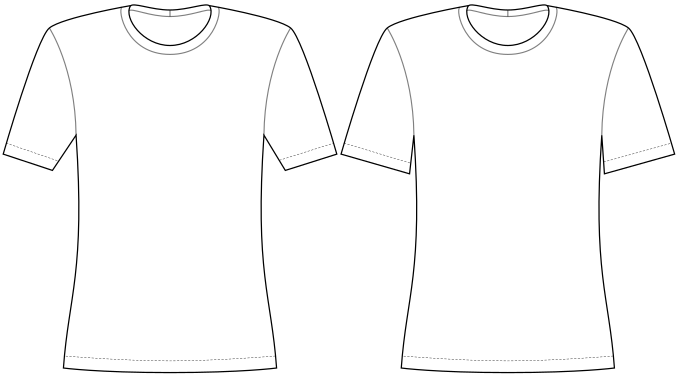
Determines the width of the sleeves.
A value of 100% will keep the sleeves the same width throughout the length.
A value of 0% will match the wrist measurement at the wrist (plus cuff ease).
Sleeve width guarantee
Controls how much of the sleeve width will be guaranteed. This determines how much we can alter the sleeve width to fit the sleeve in the armhole.
- Type: Percentage
- Default: 85%
- Minimum: 25%
- Maximum: 100%
We first draft the arm opening, then we draft a sleeve to fit it.
When all goes well, the sleeve fits perfectly, and this option is not relevant. However, if/when the sleeve does not perfectly fit the arm opening, we need to adapt it.
Since the shape and height of the sleevecap are more important than the width, we tend to prefer adjusting the width to fit the sleevecap.
To avoid the sleeve getting too narrow, we only adapt a portion of the sleeve width. This option allows you to control how much of the sleeve width is guaranteed. Increasing this option will allow us less of the width to play with to fit the sleeve. This way, the resulting sleeve will be closer to the theoretical sleeve width, and we will instead modify (more of) the sleevecap height to fit the sleeve.
Sleevecap back X
Controls the placement of the sleevecap back pitchpoint on the X-axis (horizontal)
- Type: Percentage
- Default: 60%
- Minimum: 35%
- Maximum: 65%
The documentation for this option has not been created by the creator (yet). Such is preview…
Sleevecap back Y
Controls the placement of the sleevecap back pitchpoint on the Y-axis (vertical)
- Type: Percentage
- Default: 33%
- Minimum: 30%
- Maximum: 65%
The documentation for this option has not been created by the creator (yet). Such is preview…
Sleevecap ease
The amount by which the sleevecap seam is longer than the armhole seam.
- Type: Percentage
- Default: 0%
- Minimum: 0%
- Maximum: 10%
The documentation for this option has not been created by the creator (yet). Such is preview…
Sleevecap front X
Controls the placement of the sleevecap front pitchpoint on the X-axis (horizontal)
- Type: Percentage
- Default: 55%
- Minimum: 35%
- Maximum: 65%
The documentation for this option has not been created by the creator (yet). Such is preview…
Sleevecap front Y
Controls the placement of the sleevecap front pitchpoint on the Y-axis (vertical)
- Type: Percentage
- Default: 33%
- Minimum: 30%
- Maximum: 65%
The documentation for this option has not been created by the creator (yet). Such is preview…
Sleevecap Q1 offset
Controls the curvature of the sleevecap in the first quadrant (front armhole)
- Type: Percentage
- Default: 1%
- Minimum: 0%
- Maximum: 7%
The documentation for this option has not been created by the creator (yet). Such is preview…
Sleevecap Q1 downward spread
Controls the spread of the sleevecap first quadrant curvature towards the armhole
- Type: Percentage
- Default: 6%
- Minimum: 4%
- Maximum: 20%
The documentation for this option has not been created by the creator (yet). Such is preview…
Sleevecap Q1 upward spread
Controls the spread of the sleevecap first quadrant curvature towards the shoulder
- Type: Percentage
- Default: 15%
- Minimum: 4%
- Maximum: 20%
The documentation for this option has not been created by the creator (yet). Such is preview…
Sleevecap Q2 offset
Controls the curvature of the sleevecap in the second quadrant (front shoulder)
- Type: Percentage
- Default: 4%
- Minimum: 0%
- Maximum: 7%
The documentation for this option has not been created by the creator (yet). Such is preview…
Sleevecap Q2 downward spread
Controls the spread of the sleevecap second quadrant curvature towards the armhole
- Type: Percentage
- Default: 15%
- Minimum: 4%
- Maximum: 20%
The documentation for this option has not been created by the creator (yet). Such is preview…
Sleevecap Q2 upward spread
Controls the spread of the sleevecap second quadrant curvature towards the shoulder
- Type: Percentage
- Default: 10%
- Minimum: 4%
- Maximum: 20%
The documentation for this option has not been created by the creator (yet). Such is preview…
Sleevecap Q3 offset
Controls the curvature of the sleevecap in the third quadrant (back shoulder)
- Type: Percentage
- Default: 2.5%
- Minimum: 0%
- Maximum: 7%
The documentation for this option has not been created by the creator (yet). Such is preview…
Sleevecap Q3 upward spread
Controls the spread of the sleevecap third quadrant curvature towards the shoulder
- Type: Percentage
- Default: 10%
- Minimum: 4%
- Maximum: 20%
The documentation for this option has not been created by the creator (yet). Such is preview…
Sleevecap Q3 downward spread
Controls the spread of the sleevecap third quadrant curvature towards the armhole
- Type: Percentage
- Default: 8%
- Minimum: 4%
- Maximum: 20%
The documentation for this option has not been created by the creator (yet). Such is preview…
Sleevecap Q4 offset
Controls the curvature of the sleevecap in the fourth quadrant (back armhole)
- Type: Percentage
- Default: 1%
- Minimum: 0%
- Maximum: 7%
The documentation for this option has not been created by the creator (yet). Such is preview…
Sleevecap Q4 upward spread
Controls the spread of the sleevecap fourth quadrant curvature towards the shoulder
- Type: Percentage
- Default: 7%
- Minimum: 4%
- Maximum: 20%
The documentation for this option has not been created by the creator (yet). Such is preview…
Sleevecap Q4 downward spread
Controls the spread of the sleevecap fourth quadrant curvature towards the armhole
- Type: Percentage
- Default: 6.3%
- Minimum: 4%
- Maximum: 20%
The documentation for this option has not been created by the creator (yet). Such is preview…
Sleevecap top X
Controls the horizontal location of the sleevecap top.
- Type: Percentage
- Default: 50%
- Minimum: 25%
- Maximum: 75%
The documentation for this option has not been created by the creator (yet). Such is preview…
Sleevecap top Y
Controls the height of the sleevecap. A higher value results in a higher and more narrow sleevecap.
- Type: Percentage
- Default: 45%
- Minimum: 35%
- Maximum: 125%
The documentation for this option has not been created by the creator (yet). Such is preview…
Extra bust ease
Extra amount of ease to consider when drafting the full bust adjustment. This is added on top of the chest ease and will add extra compression to the bust when negative.
- Type: Percentage
- Default: -5%
- Minimum: -30%
- Maximum: 5%
Controls the amount of ease at the bust. This option fine-tunes the strength of the full bust adjustment (FBA) and will by default add slight negative ease (and thus extra compression) to the bust area.
Values smaller than zero add negative ease to the bust (on top of the chest ease), which reduces the effect of the bust adjustment. This can add a bit of support/compression to the bust and reduces the default strength of the bust adjustment a bit, so that it is not unnecessarily performed for people without or with only smaller breasts.
Values larger than zero add positive ease to the bust (on top of the chest ease), which increases the effect of the bust adjustment and will add extra room for breasts or padding, if desired.
Ribbing stretch
How much the ribbing is stretched relative to the main fabric
- Type: Percentage
- Default: 5%
- Minimum: 0%
- Maximum: 30%
This option can be used to select the stretch factor you want to use for the ribbing.
This option is only available if the Ribbing height option is set to a nonzero value.
Construction
Crotch closure
Controls the closure at the crotch
- Type: Boolean
- Default: false
Whether to include a closure at the crotch.
When enabled, the bodysuit will have a closure at the crotch. When disabled, it will have a seam and a gusset.
Gusset length back
Controls the length of the gusset towards your back
- Type: Percentage
- Default: 25%
- Minimum: 0%
- Maximum: 80%
This option controls the length of the gusset towards your back.
Gusset length front
Controls the length of the gusset towards your front
- Type: Percentage
- Default: 40%
- Minimum: 0%
- Maximum: 80%
This option controls the length of the gusset towards your front.
Advanced
Across back factor
Controls your across back width as a factor of your shoulder to shoulder measurement.
- Type: Percentage
- Default: 95%
- Minimum: 88%
- Maximum: 100%
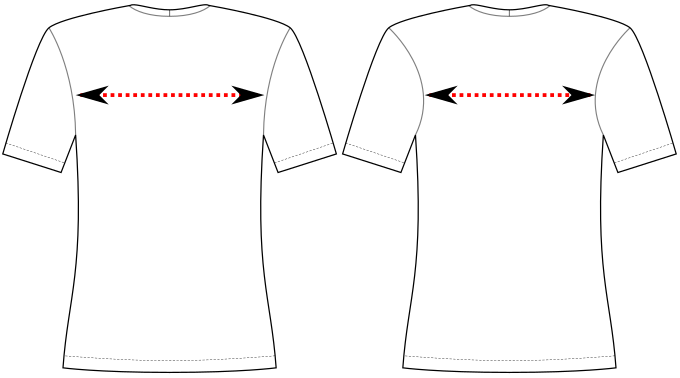
Controls your across back width as a factor of your shoulder-to-shoulder measurement
You can reduce this option if the armholes look too straight or if you want to achieve a more feminine look.
Shoulder slope reduction
The amount by which the shoulder slope is reduced to allow for shoulder padding.
- Type: Percentage
- Default: 0%
- Minimum: 0%
- Maximum: 80%
Reduces the shoulder slope to create extra room for shoulder padding.
Fit
Bust adjustment
If the pattern should be drafted with a full bust adjustment (FBA). This will result in a more fitted garment for people with breasts.
- Type: Boolean
- Default: true
If enabled, this drafts the pattern using your back half of the chest measurement and then applies a bust adjustment to the front part of the pattern.
It is recommended to enable this option for people with breasts, especially if you prefer a more fitted style.
This option doesn’t do anything if the optional bust-related measurements are not available or if the bust measurements are small enough so that no adjustment is deemed necessary.
Therefore, this option usually can be left enabled regardless of your body shape.
Waist fitting
If and how to fit the waist
- Type: List
- Default: side
- options:
- side
- dart
- off
This option determines how the design will try to fit your waist.
The waist can be either fitted using the side seam (which is the default and often used on read-to-wear shirts), or using (princess) darts.
Or you can disable fitting the waist completely, which makes sense if you want to go for a boxy/masculine look.
While princess darts/seams are untypical for a knit wear top, we provide them as a template for your custom modifications. They may be useful if you already want to add vertical seams for color blocking or if you require more extensive shaping because of low-stretch fabric and a very curvy body.
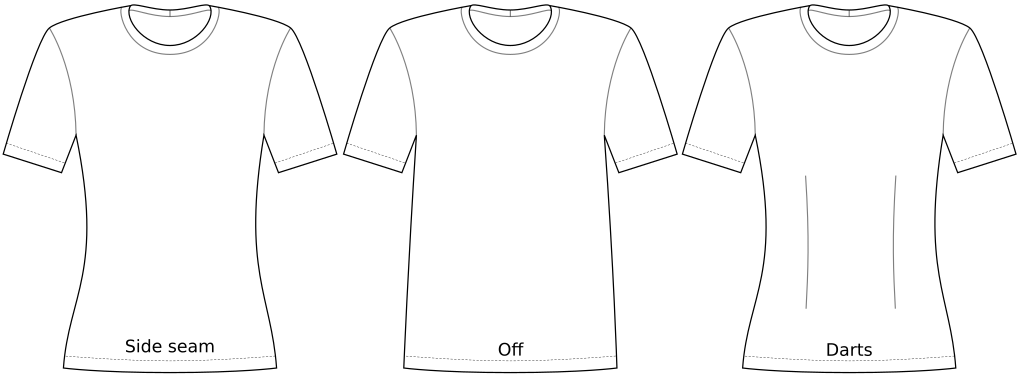
Instead of turning the waist fitting on or off, you can also set the waist ease to any value to fine-tune the exact shape you want.
Style
Shoulder seam shift: armhole side
Increase this option to shift the shoulder seam forward on the armhole side. Decreasing it shifts it backwards.
- Type: Percentage
- Default: 0%
- Minimum: -100%
- Maximum: 100%
Controls the shoulder seam location on the armhole side.
- Increase this option to shift the shoulder seam forward on the armhole side
- Decrease this option to shift the shoulder seam backward on the armhole side
Shoulder seam shift: neck side
Increase this option to shift the shoulder seam forward on the neck side. Decreasing it shifts it backwards.
- Type: Percentage
- Default: 0%
- Minimum: -100%
- Maximum: 100%
Controls the shoulder seam location on the collar side.
- Increase this option to shift the shoulder seam forward on the collar side
- Decrease this option to shift the shoulder seam backward on the collar side